Online Booking Features Every Tour Operator Needs
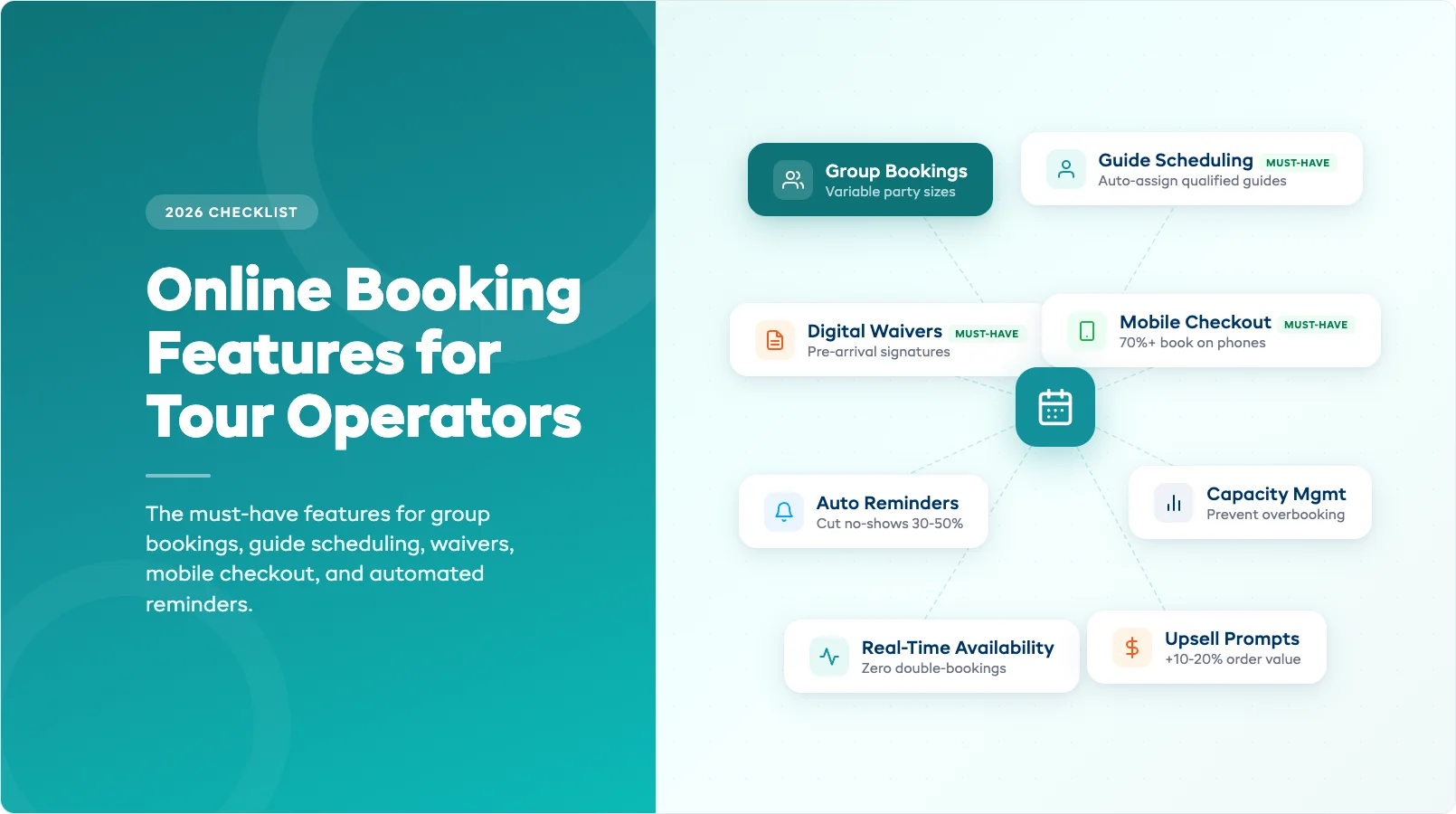
Your guests don't want to email you, wait for a reply, and then call to confirm. They want to pick a tour, choose a date, and book — in under two minutes, from their phone, at 11pm on a Wednesday. If your booking system can't handle that, you're losing customers to operators who can.
Tour operators need booking features that go beyond simple date-and-time reservations. You're managing group sizes, guide schedules, weather-dependent cancellations, and waiver collection — all before a guest shows up. The right booking system handles these moving parts automatically. The wrong one creates more admin work than it eliminates.
This checklist covers the online booking features that actually matter for tour and activity operators — and the ones you can safely skip. If you're still evaluating online booking systems for your rental or tour business, start there for the full picture.
The Feature Checklist (Quick Reference Table)
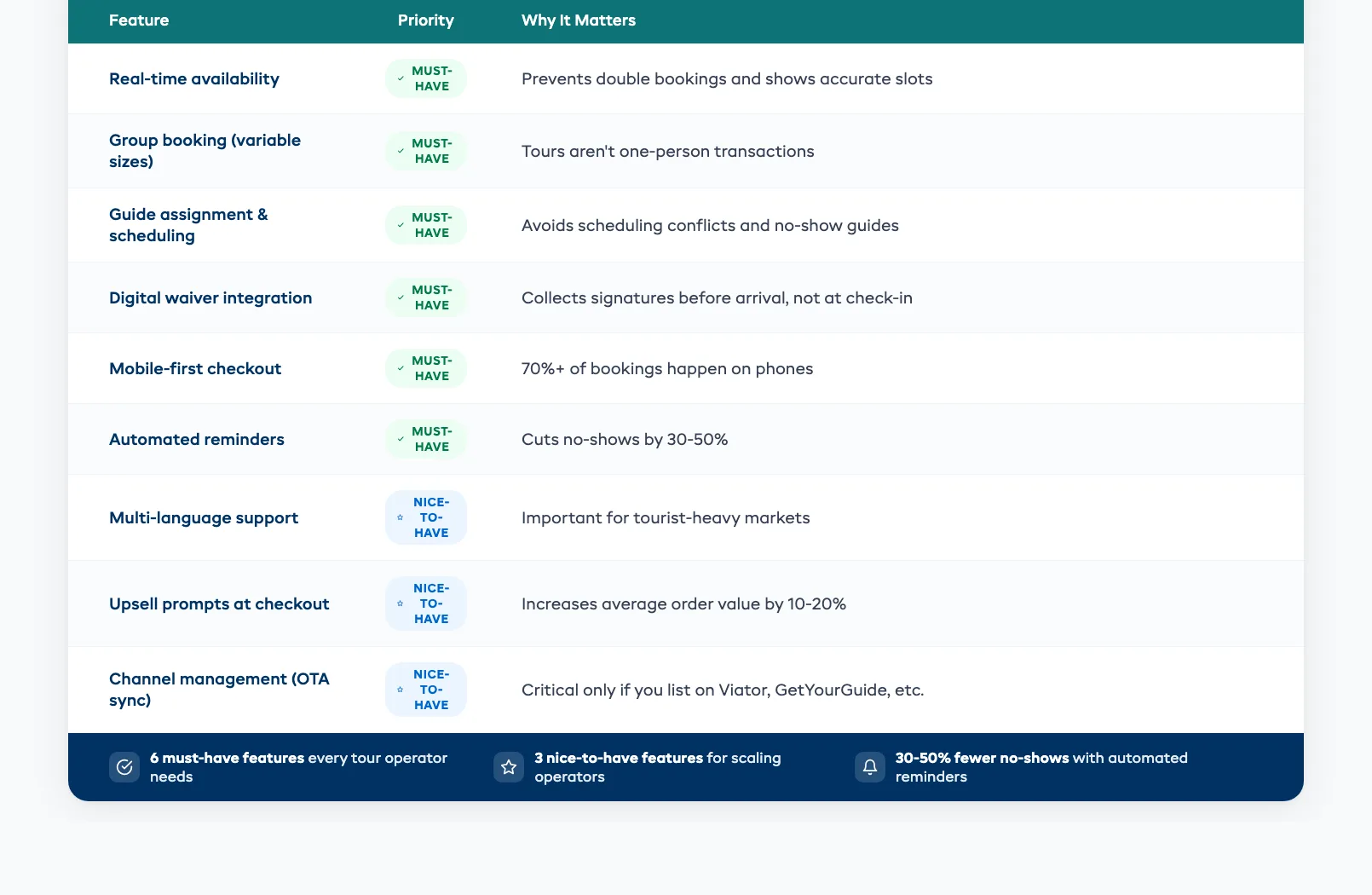
Before diving into the details, here's a quick-reference table. Bookmark it, print it, or send it to your business partner who's "still thinking about it."
| Feature | Priority | Why It Matters |
|---|---|---|
| Real-time availability | Must-have | Prevents double bookings and shows accurate slots |
| Group booking with variable party sizes | Must-have | Tours aren't one-person transactions |
| Guide assignment and scheduling | Must-have | Avoids scheduling conflicts and no-show guides |
| Digital waiver integration | Must-have | Collects signatures before arrival, not at check-in |
| Mobile-first checkout | Must-have | 70%+ of bookings happen on phones |
| Automated confirmations and reminders | Must-have | Cuts no-shows by 30–50% |
| Multi-language support | Nice-to-have | Important for tourist-heavy markets |
| Upsell prompts at checkout | Nice-to-have | Increases average order value by 10–20% |
| Channel management (OTA sync) | Nice-to-have | Critical only if you list on Viator, GetYourGuide, etc. |
The rest of this post breaks down the must-haves — what they do, why they matter, and what to look for when comparing platforms.
Group Bookings and Variable Party Sizes
Tour bookings aren't like renting a single kayak. A family of four books a snorkeling trip. A corporate group reserves 18 spots on a sunset cruise. A couple adds two last-minute friends the morning of.
Your booking system needs to handle all of these without manual workarounds. Here's what that looks like in practice:
Variable party sizes. Guests should select the number of participants during checkout — adults, children, infants — with per-person pricing that adjusts automatically. A system that only handles fixed-size bookings forces you to create separate products for "2-person tour," "4-person tour," and "6-person tour." That's a catalog management nightmare.
Capacity management. If your sunset kayak tour has a maximum of 12 spots and 8 are booked, the system should only allow groups of 4 or fewer to reserve the remaining slots. No manual tracking. No overbooking risk.
Group discounts. Parties of 6+ get 10% off? The system should apply that automatically at checkout. If you're manually calculating group rates and issuing custom invoices, you're spending 15 minutes on a task that should take zero.
Private bookings. Some groups want to book the entire tour exclusively. Your system should support private booking options alongside shared tours — with different pricing and availability rules for each.
Guide Assignment and Scheduling
Every tour needs a guide. And every guide has days off, maximum hours, certifications, and preferences. If your booking system doesn't manage guide assignment, you're running a staff calendar in a separate spreadsheet — which means scheduling conflicts and last-minute scrambles.
Here's what a proper guide scheduling feature handles:
- Auto-assignment based on availability. When a tour is booked, the system assigns an available, qualified guide automatically. No phone calls. No group chats asking "who can cover the 2pm?"
- Certification tracking. Your scuba guide needs a PADI certification. Your whitewater guide needs swift-water rescue training. The system should only assign guides who meet the tour's requirements.
- Workload balancing. Distribute tours evenly across your team so one guide doesn't get six trips on Saturday while another sits idle.
- Conflict prevention. If Guide A is already running a morning snorkel trip, they can't be assigned to a morning kayak tour at the same time. Sounds obvious — but if you're managing schedules manually, overlaps happen constantly.
For smaller operations with 2–3 guides, this might feel like overkill. But the moment you hit 5+ guides or run multiple tour types simultaneously, manual scheduling breaks down fast.
Waiver Integration at Checkout
Waivers are a legal necessity for most tour and activity operators. The question is whether you collect them efficiently or waste 15 minutes per group at check-in.
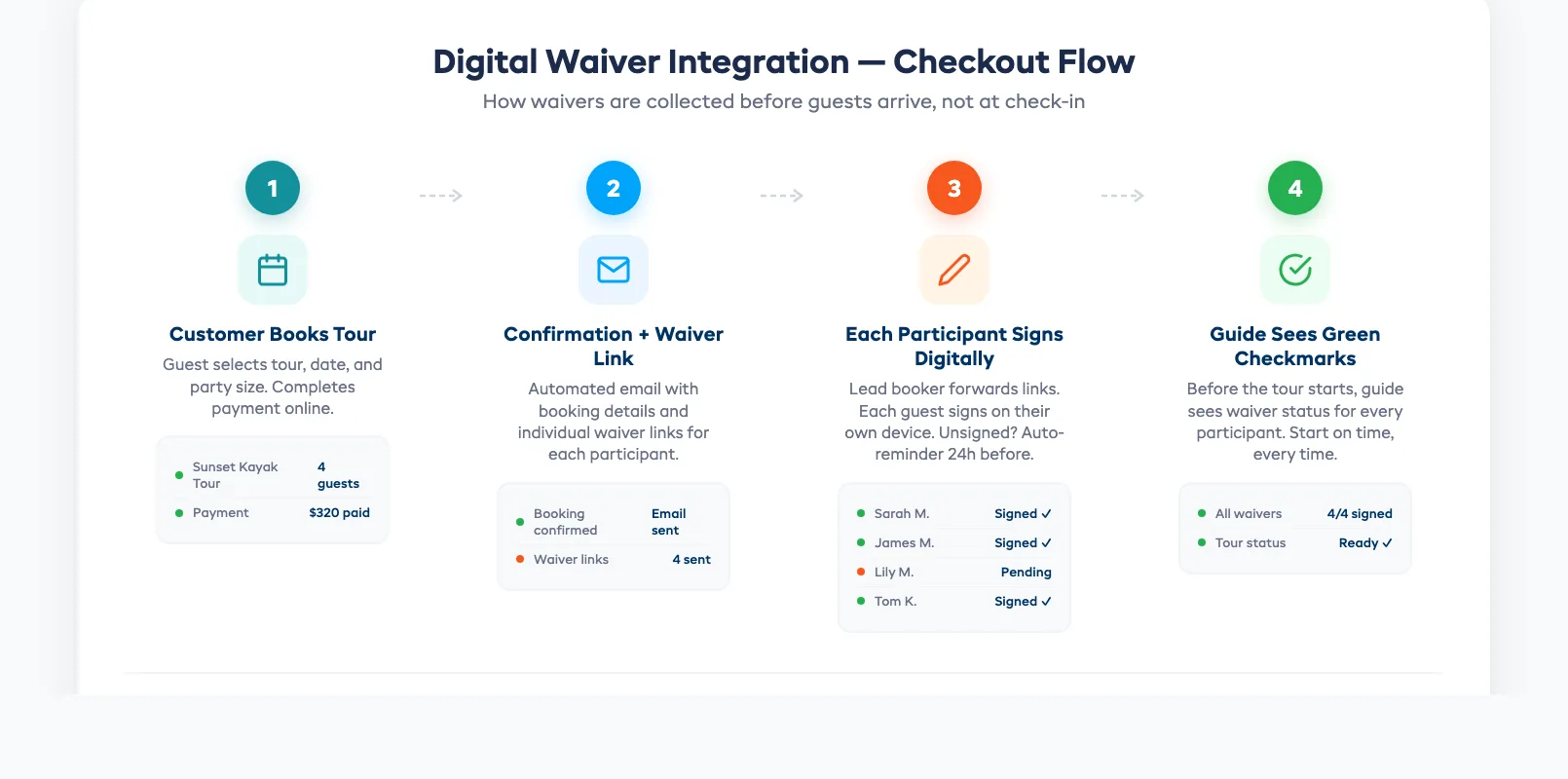
The best approach: collect digital waivers during the booking process, not at arrival. Here's how it should work:
- Customer books a tour online. Confirmation email includes a waiver link.
- Each participant signs digitally. The lead booker can forward the link to other group members.
- Waivers are stored with the booking record. Your guide sees a green checkmark next to every signed participant before the tour starts.
- Unsigned waivers trigger a reminder. 24 hours before the tour, anyone who hasn't signed gets an automatic nudge.
This eliminates the clipboard-and-pen chaos at your check-in counter. It also means your guides can start tours on time instead of waiting for the last person to read and sign a three-page liability form.
Look for systems that store waivers permanently and link them to customer profiles — not just the individual booking. Repeat customers shouldn't sign the same waiver every visit.
Mobile-First Booking Experience
This isn't a "nice feature." It's the make-or-break for your conversion rate.
Over 70% of tour and activity bookings originate on mobile devices. Your customers are researching things to do on vacation while sitting in their hotel room, scrolling on their phone. If your booking flow requires pinch-zooming, sideways scrolling, or filling out 12 form fields on a tiny screen — they'll leave.
What mobile-first actually means:
- Large, tappable buttons. No tiny links or dropdown menus designed for desktop cursors.
- Minimal form fields. Name, email, phone, party size, date. That's it for the initial booking. Collect additional details (dietary restrictions, skill levels, pickup location) in the confirmation email.
- Fast page load. Under 3 seconds. Every additional second of load time drops conversion rates by 7%.
- One-tap payment. Apple Pay, Google Pay, and saved card support. If guests have to type their credit card number on a phone keyboard, you'll lose 20–30% of them at checkout.
- Smart date picker. A calendar that shows available dates highlighted and sold-out dates greyed out — no hunting through a list.
Test your booking flow on your own phone. Start from a Google search, find your tour, and try to complete a booking. Time it. If it takes more than 90 seconds, you have work to do.
Automated Confirmations and Reminders
No-shows cost tour operators thousands per year. A guest who doesn't show up is a seat you could have sold to someone else — and you often don't find out until the tour is about to leave.
Automated messaging fixes most of this:
Instant booking confirmation. The moment a guest books, they get an email with tour details, meeting point, what to bring, and a waiver link. This builds confidence that the booking went through and reduces "did my booking work?" calls to your team.
24-hour reminder. A day before the tour, an automatic email or SMS reminds the guest of the time, location, and any prep instructions. Include a "need to reschedule?" link so they cancel early rather than simply not showing up.
Morning-of reminder. For early morning tours especially, a 6am text with the meeting point and weather forecast keeps guests on track. Tours with morning-of reminders see no-show rates drop by 30–50%.
Post-tour follow-up. An automated email 24 hours after the tour asking for a review. This builds your TripAdvisor, Google, and Viator ratings — which drives future bookings.
The key is automation. None of these messages should require your staff to send them manually. Set up the templates once, and the system handles every booking from that point forward. For a broader look at how online booking systems work for rental and tour businesses, see our complete guide.
Features You Can Skip
Not every feature on a booking platform's feature page is worth paying for — at least not on day one. Here's what you can safely deprioritise when you're getting started:
Multi-language booking pages. Important if you're in a major tourist destination with international visitors. But if 90% of your guests speak English, this can wait.
Advanced analytics and reporting. You'll want these eventually. But for the first 90 days, focus on getting bookings flowing online. Optimisation comes after you have data.
Affiliate and reseller management. Useful for operators who sell through hotel concierges or local travel agents. But most small operators don't need this until they're processing 100+ bookings per month.
Custom API integrations. Unless you have a developer on staff, skip anything that requires custom code. A good booking system should work out of the box with its built-in integrations.
AI-powered dynamic pricing. Sounds impressive, but you need at least 6 months of booking data before dynamic pricing algorithms can make useful recommendations. Start with simple seasonal pricing and adjust manually.
Focus on the must-haves first. Get bookings flowing, reduce no-shows, and free up your team's time. The advanced features will still be there when you're ready.
in one place