Tour Operator Software: The Complete Guide (2026)
Tour operator software is the backbone of every tour and activity business that runs without chaos — from the rafting company that fills boats at 6am to the whale-watching outfit that takes bookings at midnight while the captain sleeps. If you're still cobbling together a booking calendar, a separate payment tool, a waiver app, and a spreadsheet to track it all, this guide will show you a better way.
We wrote this for the operators who are tired of juggling disconnected tools and losing bookings to competitors with real-time availability. Below you'll find what tour operator software actually does, which features matter most, how to choose between platforms, and what it really costs. Whether you run two tours a day or twenty across multiple locations, the fundamentals are the same.
No jargon. No fluff. Just the practical answers you need.
What Is Tour Operator Software?
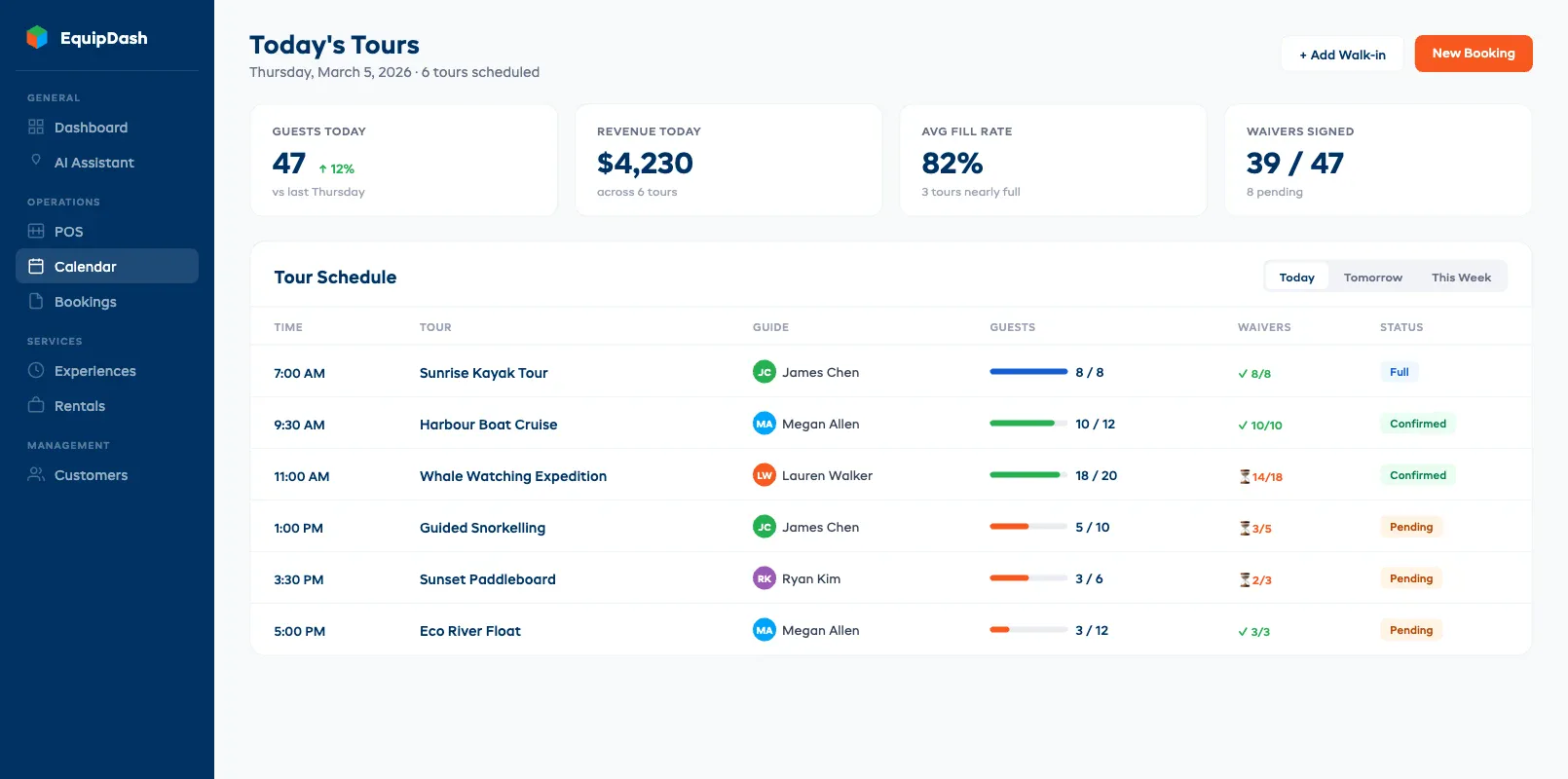
Tour operator software is a platform that manages every part of your tour and activity business in one place — bookings, availability, guide scheduling, payments, waivers, customer communications, and reporting. It replaces the patchwork of calendars, spreadsheets, and disconnected apps that most operators start with and eventually outgrow.
Picture this: a family finds your zip-line tour at 10pm, books three spots for Saturday morning, signs digital waivers, and pays a deposit — all while you're asleep. Your availability updates instantly. Your lead guide sees the booking on the morning schedule. No phone call. No manual entry. No overbooking risk.
The market is growing fast. According to Allied Market Research, the global tour and activity booking software market is projected to exceed $1 billion by 2030, driven by operators who want to move beyond manual processes and capture bookings around the clock.
At its core, tour operator software handles:
- Online booking with real-time availability by tour type, time slot, and group size
- Guide and staff scheduling matched to tour capacity and certifications
- Payment processing (deposits, full payments, refunds, group invoicing)
- Digital waivers signed before arrival
- Customer management (contact info, booking history, preferences, notes)
- Automated communications (confirmations, reminders, post-tour follow-ups)
- Reporting and analytics (revenue by tour type, guide utilisation, seasonal trends)
Some platforms — like EquipDash — go further with a built-in AI assistant (Dash AI) that answers customer questions, generates operational reports, and suggests schedule adjustments based on demand patterns. But the core value is universal: one connected system so you stop being the middleman between five tools.
Why Generic Booking Tools Fall Short for Tours
Tour operator software solves problems that generic booking tools were never designed to handle. Appointment schedulers like Calendly, Acuity, or even basic WordPress plugins treat every booking as a one-person, one-time-slot event — but tours are fundamentally different. They involve group capacity, guide availability, weather dependencies, and variable pricing that generic tools can't manage.
Here's where generic tools break down — and why tour operator software exists in the first place:
Group capacity management. A kayak tour has 12 spots. A generic booking tool doesn't understand that booking #13 should be blocked — or that the 12th spot should trigger a "last spot" urgency message. Tour operator software tracks capacity per departure time, per tour type, per location, and per guide.
Guide and resource scheduling. Your 9am rafting trip needs two certified guides, eight life jackets, and a specific raft. Generic tools don't assign resources to bookings. Tour management software matches guides to trips based on availability, certifications, and workload — and alerts you when you're short-staffed.
Variable pricing. Tours have complex pricing: adult vs child, weekday vs weekend, peak vs off-peak, group discounts, private tour premiums. Generic schedulers offer one price per slot. That forces you into workarounds that confuse customers and create manual reconciliation headaches.
Weather and cancellation handling. Rain shuts down your zip-line tour. A generic tool has no concept of weather-dependent scheduling. Tour operator software lets you cancel or reschedule an entire departure, automatically notify affected customers, and offer rebooking — in minutes, not hours of phone calls.
Channel distribution. Want to sell through your website, Viator, GetYourGuide, and a local hotel concierge desk? Generic tools don't connect to distribution channels. Tour management software syncs availability across all channels in real time, so you never oversell.
If you're running more than a couple of tours per week, the limitations of generic tools start costing you real money — in lost bookings, overbookings, and hours of admin time. That's precisely when tour operator software becomes essential.
If you're a smaller operation wondering whether you even need dedicated software, our guide to equipment rental software for small business covers what's essential vs what's overkill.
Core Features for Tour and Activity Operators
The core features of tour operator software come down to what keeps your business running on a packed Saturday: can you manage bookings, schedule guides, collect payment, and handle waivers without dropping the ball? A solid platform handles all of this from one dashboard so your team delivers great experiences instead of wrestling with admin.
Here are the features that earn their keep every day — and the ones that matter more as you scale.
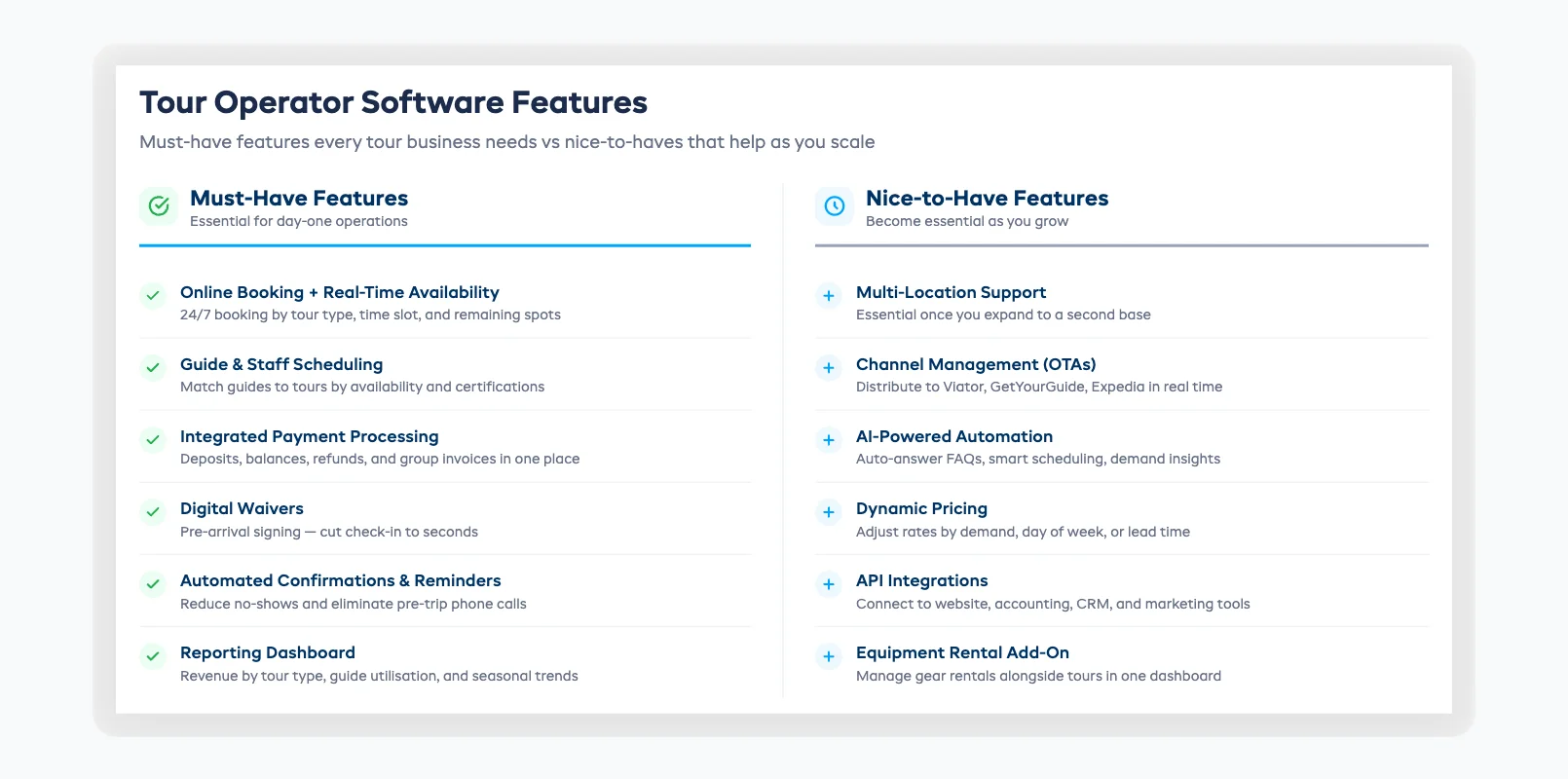
Must-haves
1. Online booking with real-time availability Your customers expect to book online — and increasingly from their phones. According to Phocuswright, over 65% of tours and activities in key markets are now booked digitally. Your tour operator software needs to show live availability by tour type, date, time, and remaining spots — and prevent double bookings across every channel. Anything less and you're losing after-hours bookings to competitors. See our guide on online booking systems for rentals for a full breakdown of how these systems work. If you also rent equipment, our guide on what to look for in rental booking software covers the features that matter most.
2. Guide and staff scheduling Matching the right guides to the right tours based on availability, certifications, and capacity is one of the biggest daily headaches for operators. Tour management software automates this: guides see their schedules, you see gaps and conflicts before they happen, and customers always get a qualified guide.
3. Integrated payment processing Collecting deposits at booking, balances at check-in, and handling refunds or group invoices should all happen inside your tour software. Separate payment tools create reconciliation problems and slow down your morning workflow when 30 customers arrive at once.
4. Digital waivers Paper waivers slow check-in, get lost, and create filing headaches. Built-in digital waivers let customers sign before arrival — reducing check-in time to seconds and storing everything electronically with automatic compliance tracking.
5. Automated confirmations and reminders Every booking should trigger an automatic confirmation. Every upcoming tour should trigger a reminder with meeting-point details, what to bring, and cancellation policy. This is the single easiest way to reduce no-shows and eliminate pre-trip phone calls. For a complete walkthrough of what else you can automate, see our guide on how to automate your rental business.
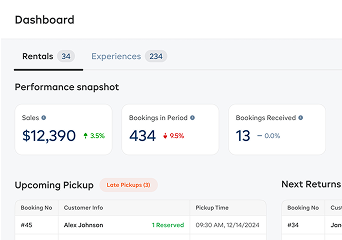
6. Reporting dashboard If you can't answer "which tour generated the most revenue last month?" or "what's my guide utilisation rate?" in under a minute, your platform isn't pulling its weight. Standard reports on revenue by tour type, booking source, seasonal patterns, and customer demographics should come out of the box.
Nice-to-haves (that become must-haves as you grow)
- Multi-location support — essential once you expand to a second base
- Channel management — distributes availability to OTAs like Viator, GetYourGuide, and Expedia
- AI-powered automation — answers customer FAQs, generates reports, and flags scheduling conflicts automatically
- Dynamic pricing — adjusts rates based on demand, day of week, or how far in advance the booking is made
- API integrations — connects to your website, accounting software, CRM, or marketing tools
Tour-Only vs All-in-One (Tours + Rentals)
This is where the tour operator software decision gets personal. If you only run tours and experiences, a tour-only platform will cover your needs. But if you also rent equipment — kayaks, bikes, snorkel gear, ski equipment — you face a choice: run two separate systems or find an all-in-one platform that handles both.
Tour-only platforms
Platforms like FareHarbor, Peek Pro, Rezdy, and Bokun focus exclusively on tours and experiences. They're built for booking management, guide scheduling, and distribution to OTAs. If you're a pure tour operator with no rental inventory, these can work well.
The trade-off: if you ever add equipment rentals (even as a side offering), you'll need a second system — with a separate login, separate customer database, and separate reports. Tour operator software that only handles tours can't track gear inventory. If inventory is a meaningful part of your operation, our rental inventory management guide covers what to look for in a tracking system.
All-in-one platforms (tours + rentals)
All-in-one platforms manage both tours and equipment rentals in a single dashboard. One customer database. One booking flow. One set of reports. One login for your team.
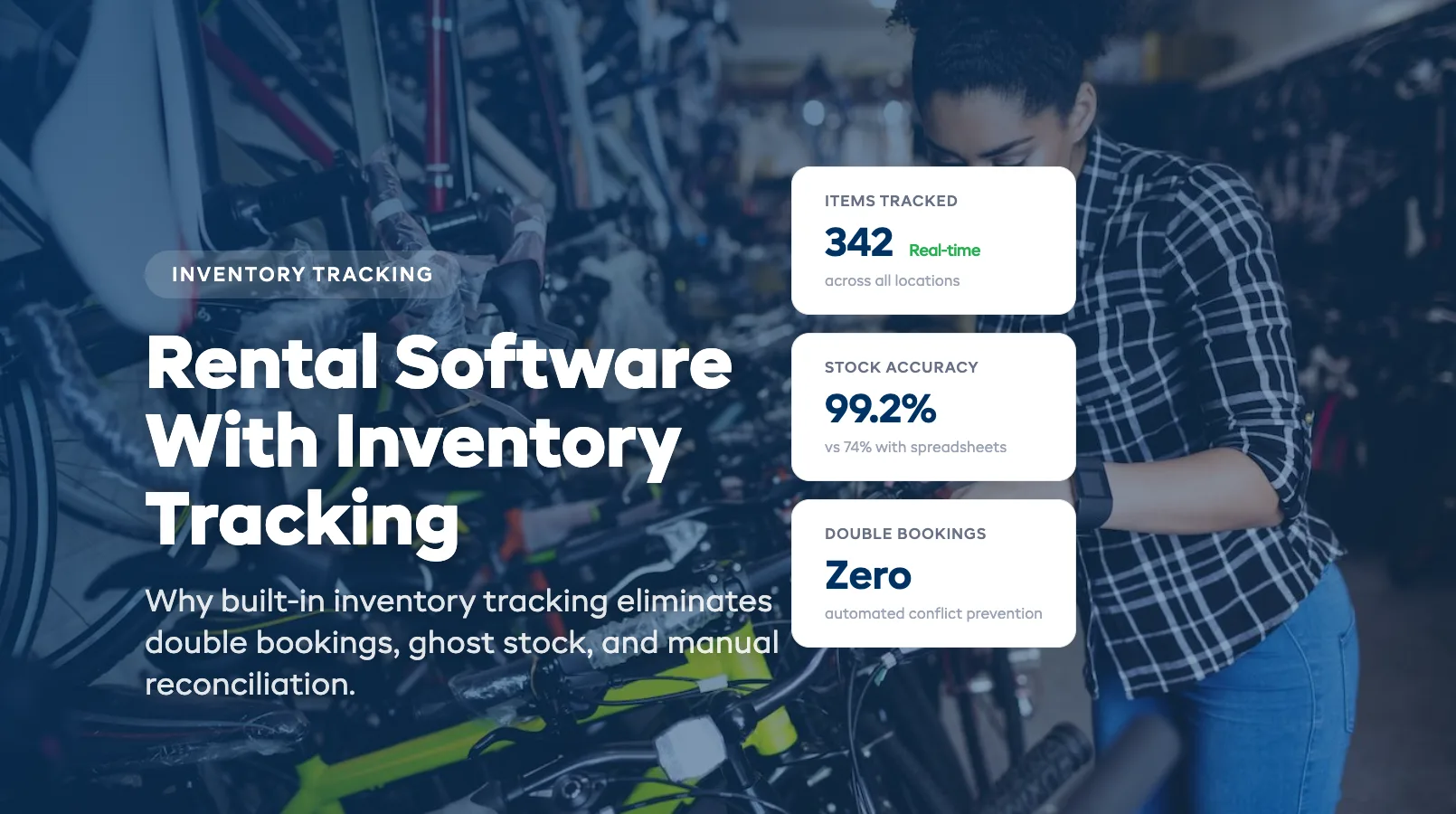
EquipDash was purpose-built as an all-in-one platform for operators who run both tours and rentals. A dive shop that offers guided dives and rents snorkel gear uses one system for both. A bike tour company that also rents bikes by the hour doesn't need to reconcile two separate inventories — and built-in inventory tracking ensures every item is accounted for across both sides of the business.
How to decide
Ask yourself two questions:
- Do I rent any equipment today — or might I in the next 12 months? If yes, all-in-one saves you from a painful migration later.
- Do I sell through multiple OTA channels? If Viator and GetYourGuide are major booking sources, make sure your platform has strong channel management — some all-in-one platforms prioritise this more than others.
For operators with both tours and rentals, the cost savings and operational simplicity of a single platform almost always outweigh the feature depth of a tour-only tool. For pure tour operators who will never rent gear, either path works — but the all-in-one still gives you room to grow.
How to Choose the Right Platform
Choosing the right tour operator software starts with your operation. A solo guide running sunset kayak tours has different needs than a 40-employee adventure company with five tour types and three locations. Here's a practical framework.
Step 1: List your non-negotiables
Write down the five things you absolutely must have. For most tour operators: online booking with real-time availability, guide scheduling, integrated payments, automated confirmations, and a reporting dashboard. Everything else can come later.
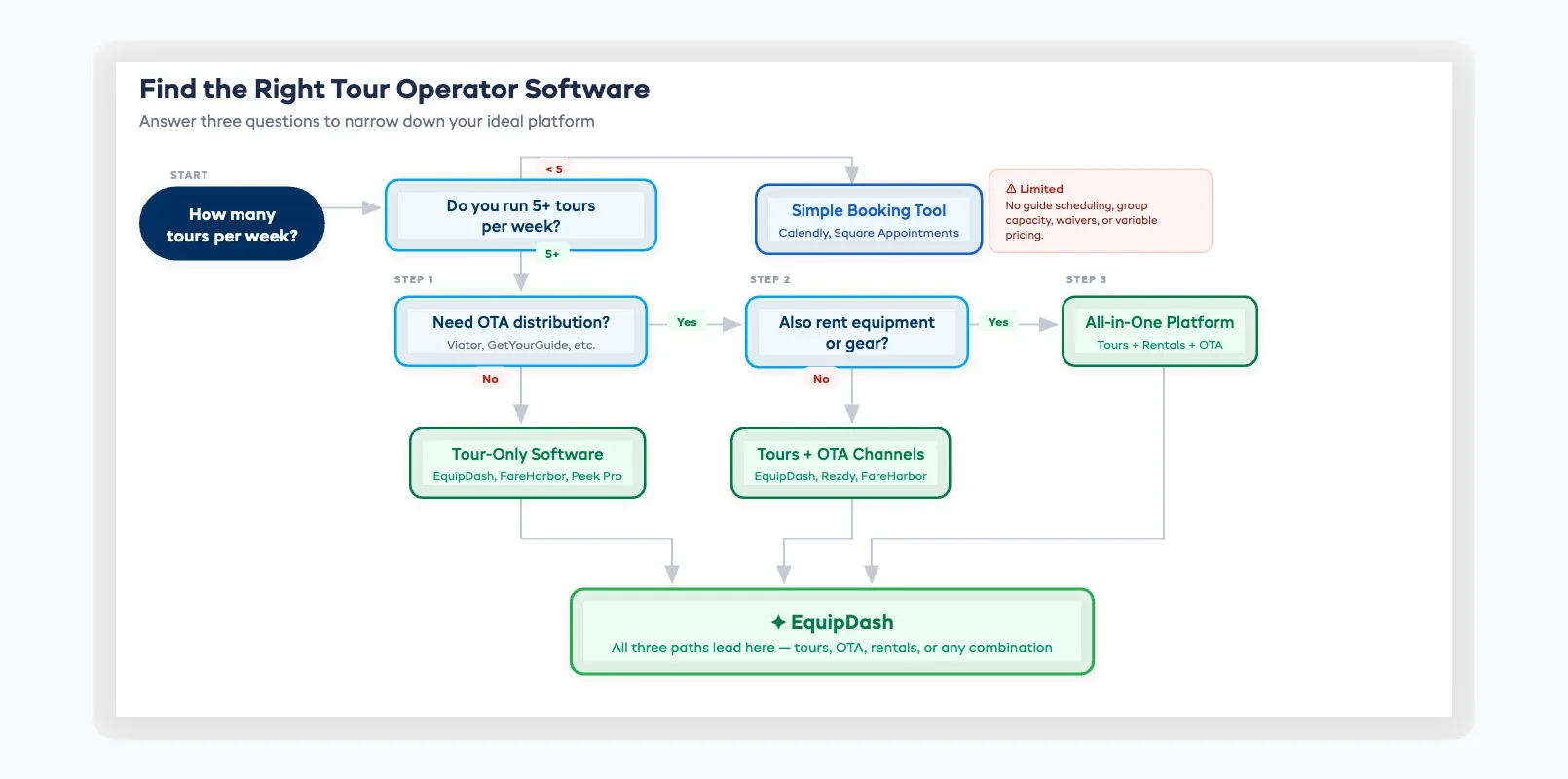
Step 2: Match your business type
- Tours and experiences only → Tour-focused platforms (FareHarbor, Peek Pro, Rezdy, Bokun)
- Tours plus equipment rentals → All-in-one platforms (EquipDash)
- Heavy OTA distribution → Prioritise platforms with built-in channel managers
Step 3: Check the pricing model
Some platforms charge a flat monthly fee. Others take a commission on every booking — often 3–6%. Some do both. At high booking volumes, commission-based pricing can quietly cost you thousands more per year than a flat-rate subscription. Always calculate total annual cost at your expected volume before signing up.
Step 4: Test with real scenarios
Most tour operator software platforms offer free trials (typically 14–21 days). Don't just click around — create actual tours, set availability, book a test trip, assign a guide, process a payment, and run a report. One afternoon of real testing tells you more than any feature comparison page.
Step 5: Read reviews from operators like you
Look for reviews from businesses similar to yours in size, tour type, and location. A platform that works brilliantly for a European walking tour company might not fit a whitewater rafting outfitter in Colorado. G2, Capterra, and Software Advice are solid starting points. To compare tour and rental platforms side by side, see our full comparison of 10 platforms scored across six criteria.
For small operators still deciding between options, our small business guide covers exactly what features are worth paying for at your stage. And if you're building a tour business from scratch, our step-by-step guide on how to start an equipment rental business covers everything from market research to opening day.
Pricing: What Tour Operators Should Expect
Tour operator software typically costs between $29 and $400+ per month, depending on features, number of tours, and number of locations. But the sticker price rarely tells the full story. Understanding how pricing models work will save you from surprises down the road.
Common pricing models
Flat-rate monthly subscription — You pay a fixed price per month (e.g., $29, $69, or $149) based on the tier you choose. Higher tiers unlock more tours, more locations, or advanced features. This is the most predictable model and the easiest to budget around.
Commission-based — The platform takes a percentage of every booking (typically 3–6%). Low entry cost, but expenses scale with your revenue. At $200,000 per year in bookings, a 5% commission means $10,000 per year in platform fees alone — on top of credit card processing.
Hybrid — A monthly fee plus a per-booking commission. This model is common in the tour space (FareHarbor and Peek Pro both use variations of it). It can be cost-effective at low volumes but expensive at scale.
Hidden costs to watch for
- Transaction fees beyond standard credit card processing (2.9% + $0.30 is the baseline; anything above that is the platform's cut)
- Channel distribution fees for OTA bookings routed through the platform
- Add-on charges for features like waivers, email marketing, or advanced analytics
- Setup or onboarding fees ($500–$2,000 is common for guided migration)
- Annual contract lock-in with early termination penalties
EquipDash uses a transparent flat-rate model: $29/mo (Starter), $69/mo (Growth), or $149/mo (Pro), with a declining platform fee (2%/1.5%/1%) and a 21-day free trial. No hidden fees, no surprise commissions. Annual billing saves 20%.
The most important number: total annual cost at your expected booking volume. Run the maths on any tour operator software before you commit.
Implementation and Getting Your Guides On Board
Setting up tour operator software doesn't require a month-long IT project. Most cloud-based equipment rental software can be operational within 3–7 days for a small to mid-size tour business. The biggest variable isn't the technology — it's getting your guides and front-desk staff comfortable with the new workflow.
Days 1–2: Account setup and tour configuration
Create your account, build your tour catalogue (names, descriptions, durations, capacity, pricing), and set your schedules and availability windows. Most platforms let you import data via CSV or set it up manually with a guided wizard.
Days 3–4: Booking flow, payments, and waivers
Configure your online booking widget or page, connect your payment processor, and upload your waiver templates. Test the full customer journey: find a tour, book, pay, sign a waiver, receive a confirmation email. Do this yourself before involving your team.
Day 5: Guide and staff onboarding
This is the make-or-break step. Walk each guide through their daily workflow: checking the schedule, viewing customer details, marking attendance, and handling on-the-day changes. Keep it focused on what they'll actually do every morning. Most tour management platforms are intuitive enough that guides learn the basics in 30–60 minutes.
Days 6–7: Soft launch and go live
Embed the booking widget on your website, update your Google Business Profile and OTA listings, and start accepting online reservations. Run in parallel with your old system for a few days if that makes you more comfortable — but don't drag it out. Switching to tour operator software is easier than most operators expect.
Pro tip: Start with your top 2–3 tours. Get the booking flow and guide scheduling dialled in, then add the rest. Don't try to migrate everything in one weekend.
FAQ
What is tour operator software used for?
Tour operator software manages bookings, guide scheduling, payments, waivers, and customer communications for tour and activity businesses. It replaces the patchwork of spreadsheets, standalone calendars, and disconnected tools with a single connected platform that updates availability, schedules, and records in real time.
How much does tour operator software cost?
Most platforms charge between $29 and $400 per month, depending on features and the number of tours or locations you manage. Some also take commissions of 3–6% per booking, which can add thousands to your annual cost. Always calculate total annual cost at your projected booking volume before committing to a plan.
What makes tour operator software different from general booking software?
General booking tools handle simple time-slot appointments. Tour operator software manages group capacity per departure, guide assignments based on certifications, variable pricing (adult/child, peak/off-peak), weather-dependent cancellations, and multi-channel distribution to OTAs. These are fundamental tour operations that generic schedulers can't support.
Do I need separate systems for tours and equipment rentals?
Not if you choose an all-in-one platform. EquipDash, for example, manages both tours and equipment rentals from a single dashboard — one customer database, one booking flow, one set of reports. Running two separate systems creates data silos, double the admin work, and a fragmented customer experience.
Can small tour operators afford dedicated software?
Most platforms offer starter tiers between $29 and $49 per month — less than the cost of one lost booking. The ROI shows up quickly: fewer no-shows from automated reminders, more after-hours bookings from 24/7 availability, and hours of saved admin time weekly. The software pays for itself fast.
How long does it take to set up?
Most small tour businesses are fully operational within 3–7 days. The biggest time investment is building your tour catalogue and configuring pricing. Guide training typically takes 30–60 minutes for the daily workflow basics — checking schedules, viewing bookings, and marking attendance. Cloud-based platforms require no installation.
What if my guides aren't tech-savvy?
Modern tour operator software is designed for operators, not IT professionals. Most platforms have simple mobile-friendly dashboards that guides can learn in under an hour. Start with the daily essentials — view schedule, check customer list, mark attendance — and layer in advanced features over time. The interface is no harder than using a smartphone.
Should I choose a tour-only platform or an all-in-one?
If you only offer tours and have no plans to rent equipment, a tour-only platform works fine. If you also rent gear — or might in the next year — an all-in-one platform saves you from running two systems and a painful migration later. The simplicity of one dashboard usually outweighs niche feature differences.
Conclusion: Your Tours Deserve a System That Keeps Up
Tour operator software isn't a luxury for large adventure companies — it's the foundation that lets any tour business book more, stress less, and deliver better experiences. The right platform replaces the spreadsheet scramble with a system that works while you sleep, keeps your guides informed, and never oversells a trip.
If you're ready to see the difference, start with a free trial. No credit card, no commitment — just 21 days to test-drive a platform built for tour and activity operators.
in one place